










Index
- Signing a PDF document with a digital signature: Legal validity and advantages over paper
- Legal Framework: Is the digital signature on PDFs valid in Spain and the EU?
- Requirements for signing a PDF with a fully legally valid digital signature
- How to Sign a PDF Document with a Digital Certificate Step by Step
- How to Verify a Digital Signature in a PDF
- Best Practices for Signing PDF Documents Quickly, Securely, and in Compliance with the Law
- How to sign a PDF document with a digital signature: The Tecalis advantage
- Frequently Asked Questions About Digital Signatures in PDFs
'/%3e%3cpath%20d='M13.6641%205.76325L30.0315%2018.448M50.9456%205.30859L31.8502%2019.8575L30.0315%2018.448M13.6641%2031.6784L30.0315%2018.448'%20stroke='white'%20stroke-width='2'%20stroke-linecap='round'%20stroke-linejoin='round'/%3e%3cpath%20d='M34.5781%2017.582L50.9456%2031.2216'%20stroke='white'%20stroke-width='2'%20stroke-linecap='round'%20stroke-linejoin='round'/%3e%3cdefs%3e%3clinearGradient%20id='paint0_linear_137488_197253'%20x1='12.75'%20y1='5.60216'%20x2='38.5997'%20y2='41.6392'%20gradientUnits='userSpaceOnUse'%3e%3cstop%20offset='0.161458'%20stop-color='%23FF8066'/%3e%3cstop%20offset='1'%20stop-color='%237756DB'/%3e%3c/linearGradient%3e%3c/defs%3e%3c/svg%3e)
The best content in your inbox
Moving beyond physical formats and establishing a paperless workflow is an essential requirement for business efficiency. To take this step with full confidence, mastering how to sign a PDF document with a digital signature is crucial: it is the only way to ensure the integrity, authenticity, and non-repudiation of any binding agreement. This technological adoption not only drastically accelerates contracting cycles but, backed by advanced cryptography and strict regulatory frameworks, provides legal certainty far superior to that of the traditional handwritten signature.
This article breaks down, step by step, the legal aspects, essential technical requirements, and best practices for successfully implementing an online digital signature, highlighting how advanced solutions like Tecalis are completely redefining the contractual landscape.
Sign a PDF document with a digital signature for free
Try Tecalis SignSigning a PDF document with a digital signature: Legal validity and advantages over paper
The digitization of signing processes has transformed the way companies interact with customers, suppliers, and employees, making digital signatures in PDFs a cornerstone in environments where agility and legal certainty are non-negotiable. Unlike paper, which is vulnerable to forgery, alteration, or loss and relies on costly handwriting analysis in cases of repudiation, the electronic signature is secured through asymmetric cryptography.
This guarantees the document’s absolute integrity: if a single bit is altered after signing, the cryptographic hash breaks instantly, revealing the tampering. Furthermore, as it is validated by Trust Service Providers (under regulations such as eIDAS), an advanced biometric signature possesses probative value equivalent to or greater than that of a handwritten signature, ensuring unparalleled technical traceability thanks to qualified time stamps and detailed logging of all actions.
This technological leap not only provides legal robustness but also drives business transformation through three key advantages:
- Operational efficiency and cost savings: It eliminates the expenses and delays associated with printing, traditional courier services, and physical storage.
- Closing global deals: It enables the formalization of complex international contracts in a matter of minutes, securely centralizing all information in the cloud.
- Cross-functional strategic necessity: Mastering this tool is no longer an innovative option but has become a critical skill for executives and teams in any sector.
| Feature | Paper Signature (Handwritten) | Digital Signature on PDF |
|---|---|---|
| Document Integrity | Vulnerable to alterations or page substitution. | The cryptographic hash is broken if a single bit is altered after signing. |
| Signatory Identity | Requires handwriting analysis in case of repudiation. | Validated by a Trust Service Provider (eIDAS). |
| Traceability | Limited to the physical medium. | Qualified time stamp and audit trail. |
| Cost and Time | High (printing, courier service, physical storage). | Low (instantaneous, global, cloud storage). |
Most Common Legal and Professional Use Cases
The use of digital certificates and electronic signature platforms spans virtually every department within an organization:
- Human Resources: Signing of employment contracts, non-disclosure agreements (NDAs), occupational risk prevention (ORP) forms, and payroll distribution.
- Sales and Business Development: Closing B2B and B2C commercial agreements, service contracts, quotes, and purchase orders.
- Legal and Finance Department: Approval of annual financial statements, signing of insurance policies, SEPA mandates, lease agreements, and electronic powers of attorney.
- Healthcare and real estate sector: Informed patient consent forms, earnest money contracts, and purchase agreements.
The electronic signature has established itself as a cross-functional and indispensable tool for the entire organization. Its implementation automates and ensures the full legal validity of critical workflows across all areas, from employment agreements in Human Resources and contracts in Sales to notarial and medical documents.
How to legally sign a PDF document with a digital signature
For the process to be fully valid, simply pasting a scanned image of a signature is not enough, as this lacks strong legal evidentiary value. It is essential to use platforms that comply with current regulations and are tailored to the risk level of each transaction. At the most basic level is the simple electronic signature, a streamlined method that is useful and sufficient for low-risk internal processes, such as reading and accepting corporate policies.
For 90% of commercial and labor agreements, it is most advisable to use the Advanced Electronic Signature (whether biometric or via OTP or a one-time password). This level uniquely binds the signer, allows for their irrefutable identification, and guarantees that the document has not been altered. Additionally, the use of biometrics adds an invaluable forensic layer in the event of legal disputes.
Finally, for the most critical and high-risk transactions, Advanced Electronic Signature + KYC verification should be used. This method requires signing the PDF with a reliable identity verification process. Its greatest strength lies in the fact that it carries a presumption of full validity, being legally equivalent to a handwritten signature without the need to provide any prior expert evidence in the event of repudiation.
Legal Framework: Is the digital signature on PDFs valid in Spain and the EU?
The unequivocal answer is yes. The validity of digital signatures, both online and offline, is safeguarded by a strict and unified regulatory framework across Europe. The eIDAS Regulation establishes a common standard for electronic signatures throughout the European Union. This regulation ensures the interoperability and mutual recognition of digital identities. In Spain, this regulation is supplemented by Law 6/2020 of November 11, which regulates certain aspects of trusted electronic services. The cornerstone of this framework is the principle of non-discrimination: a signature shall never be denied legal effect or admissibility as evidence in a trial merely because it is in electronic format. This evidentiary validity becomes even stronger in the event of a legal dispute, where the burden of proof depends on the level of security employed; in the case of an advanced biometric signature, the law automatically presumes its authenticity and integrity, placing the burden of proof on the opposing party attempting to repudiate it to demonstrate that it is invalid.
Meanwhile, when using an advanced signature, the legal strength lies in the Evidential Document generated by the provider platform. This technical document constitutes a robust body of evidence for any judge by collecting irrefutable electronic evidence: IP addresses, geolocation, SHA-256 hashes of the documents, OTP codes via SMS, and the timestamp from a Time Stamping Authority.
What type of electronic signature do you need? Learn about the different types and their legal validity in this guide
Download free guideRequirements for signing a PDF with a fully legally valid digital signature
To ensure that a digitally signed PDF document is unassailable from both a technical and legal standpoint, very specific requirements based on the European PAdES standard must be met. These are the fundamental pillars that guarantee maximum security:
- Valid and non-revoked digital certificate: The signer’s identity must be backed by an X.509 certificate issued by a Qualified Trust Service Provider.
- Public-Key Cryptography: The system must calculate a hash value of the original PDF and encrypt it with the signer’s private key. Any subsequent changes will alter the hash, invalidating the signature.
- eIDAS-compliant software or platform: An environment that complies with encryption and data protection regulations (GDPR) is required.
- Qualified Time Stamp: Essential for certifying the exact time of the signature, preventing fraud regarding the contract date and ensuring the signature remains valid even if the signer’s certificate expires in the future.
Finally, to ensure the file’s legal durability, long-term validation must be applied. This process involves embedding the certificate revocation status (OCSP or CRL) within the PDF itself at the time of signing, ensuring that the document can be validated without issues 10, 20, or even 50 years later, even if the original issuing authority no longer exists.

How to Sign a PDF Document with a Digital Certificate Step by Step
Signing a PDF document with a digital certificate requires a specific technical procedure. You can use a certificate installed on your computer, a USB token, or a cryptographic card. To do this, it is common to use industry-standard software such as Adobe Acrobat Reader. This process applies the electronic identity securely and with full validity. Additionally, it guarantees the file’s integrity. To achieve this, it uses the operating system’s certificate store (Windows or macOS). Finally, it embeds the credentials into the document’s internal structure without the need for external platforms.
To complete this process correctly, follow these steps:
- Open the document: Launch Adobe Acrobat Reader and open the PDF file you need to sign.
- Access the certificates tool: Go to the top menu, select Tools > Certificates. A new top toolbar will appear.
- Start the signing process: Click Sign Digitally. The cursor will change to a cross.
- Draw the signature box: Click and drag the cursor to create a rectangle in the document where you want your signature to appear.
- Select your certificate: A pop-up window will open showing the digital certificates stored in your operating system’s certificate store (Windows/macOS). Select the certificate corresponding to your identity (for example, the one from FNMT, DNIe, or Camerfirma).
- Customize the appearance (Optional): You can choose which information to display visually (name, location, date, logo, or scanned image of your handwritten signature).
- Sign and save: Click Sign. The system will prompt you to save the PDF file. Enter the PIN or password for your private certificate if the system requires it (CSP or hardware token).
- Signature generation: The software will calculate the hash algorithm, encrypt it with your private key, embed the signature into the PDF structure (Adobe signature dictionary), and permanently save the sealed document.
How to Verify a Digital Signature in a PDF
Knowing how to verify a digital signature in a PDF is just as crucial as the act of signing itself. Receiving a signed document has no practical or legal value if its absolute authenticity and integrity cannot be immediately verified.
When opening the file in compatible readers such as Adobe Acrobat, the software performs an automatic data check. To review the details manually, simply access the Signatures Panel by clicking the pen-shaped icon located in the left-hand side menu.
Within this panel, the validation status is displayed through three visual indicators that determine the file’s integrity. A green checkmark confirms that the signature is valid, the document has not been altered, and the certificate is backed by trusted lists such as the AATL (Adobe Approved Trust List) or EUTL (European Union Trust List). Meanwhile, a yellow triangle warns that, although the signature is correct, the root certificate is not trusted on that specific device (a common situation with self-signed certificates). Finally, a red cross (X) represents a critical alert indicating that the certificate is completely invalid or, in the worst-case scenario, that the text has been tampered with. To ensure the detection of such subsequent alterations, the PAdES standard operates as follows:
- Layered structure: The PDF is organized into different revisions, ensuring that digital signatures mathematically lock the previous content and shield the original information.
- Traceability of changes: If any modification occurs after signing (such as adding text or deleting clauses), the panel will indicate exactly which revision altered the document, leaving every new addition recorded as a separate, traceable version.
Knowing how to verify a digital signature is just as crucial as signing it to ensure the document’s authenticity and integrity. Competent readers perform automatic checks using visual status indicators, while the PAdES standard secures the file by structuring it into immutable layers that track any subsequent alterations.
Best Practices for Signing PDF Documents Quickly, Securely, and in Compliance with the Law
For organizations, relying on every customer to have a digital certificate installed creates unacceptable friction. This requirement often leads to abandonment during the conversion and signing of contracts. Current best practices dictate the use of integrated cloud platforms. These solutions simplify the end-to-end process and guarantee full legal validity. Adopting this technological approach allows companies to streamline their workflows. Additionally, it improves the customer experience and ensures regulatory compliance. To achieve this perfect balance between agility and legality, the following strategies are recommended:
- Implement KYC/AML onboarding solutions: Combine identity verification (via facial recognition and OCR scanning of ID cards/passports) with the issuance of a single-use digital certificate. This allows electronic signatures to be generated in seconds from the user’s mobile device.
- Reduce friction through design: The online digital signature should be accessible via a simple web link or SMS. The user should not have to download any app or install complex cryptographic software.
- API Centralization and Automation: Integrate the signature platform directly into the company’s ERP or CRM so that contracts are automatically sent and archived after signing.
- Secure storage of supporting documents: Ensure that your provider retains a detailed audit trail for at least 5 years (as required by many European tax and legal regulations), backed by blockchain technology or notarial repositories.
How to sign a PDF document with a digital signature: The Tecalis advantage
When choosing a technology partner to meet the need for digitally signing a PDF document, Tecalis Sign stands out as one of the most advanced and reliable solutions in Europe and globally. Unlike generic alternatives, this suite stands out for its native compliance with the eIDAS Regulation, ensuring that every signature—whether advanced, biometric, or KYC-based—has indisputable legal standing in any court. This ensures that corporate processes not only gain in agility but also operate under the umbrella of the strictest European regulations regarding trust services and document integrity.
Its technical superiority is evident in a robust approach to security and identity verification. Rather than simply sending an email, the solution integrates AI-driven KYC processes to confirm the true identity of the person behind the screen before allowing them to sign. Additionally, by employing advanced biometric technology, it captures unique parameters such as pressure, speed, and stroke acceleration. This sensitive data is protected by asymmetric encryption in strict compliance with the GDPR, so that only a judge or notary holds the key to decrypt it in the event of a dispute. All of this, combined with blockchain-backed traceability, generates a comprehensive evidentiary document that safeguards the principle of non-repudiation.
Finally, the platform successfully combines this extremely high level of legal security with a user experience characterized by multi-channel access and a completely frictionless process. With Tecalis Sign, companies can send PDF documents for signature through everyday channels such as SMS, WhatsApp, or email. This allows customers to formalize legal and binding contracts in less than a minute directly from any smartphone. By eliminating the need to install third-party apps or have digital certificates pre-installed on the user’s device, conversion rates are optimized, and agreements are closed quickly and 100% securely.
Frequently Asked Questions About Digital Signatures in PDFs
Is an electronic signature the same as a digital signature?
Although they are used as synonyms, technically they are not the same. An electronic signature is the broad legal concept (data in electronic format attached to other electronic data that the signer uses to sign). A digital signature is the underlying technology (mathematical algorithms and public-key cryptography) used to implement a secure, advanced, or KYC-compliant electronic signature.
What happens if the digital certificate I used to sign the PDF expires?
If the document was signed using software or a platform that applied a Qualified Time Stamp and Long-Term Validation policies, the signature will retain its legal validity indefinitely, as it is certified that at the exact moment the signature was made, the certificate was valid and intact.
Can a PDF be signed from a mobile phone?
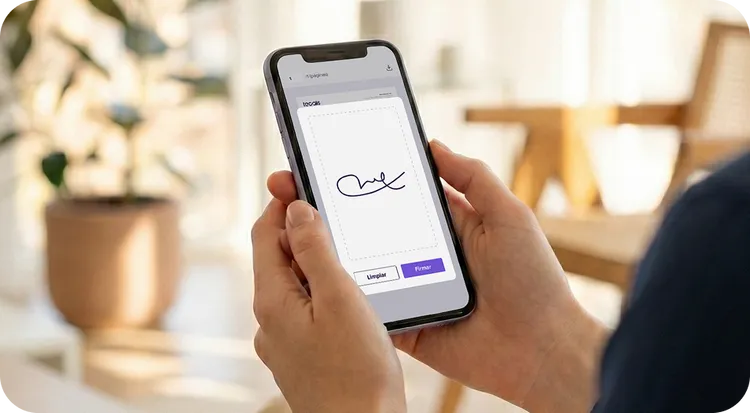
Yes. Through eIDAS cloud platforms such as Tecalis, the recipient receives a link via SMS or email. Upon clicking, they view the PDF adapted to their smartphone screen, enter a security OTP code or draw their biometric signature, and the platform handles all cryptographic sealing on the cloud servers, returning the final signed PDF to both parties.
Glossary of Terms
- Hash: An advanced one-way mathematical algorithm that transforms a large set of variable data (such as a lengthy PDF document) into a short string of alphanumeric characters of strictly fixed length, serving for practical purposes as a unique and immutable “digital fingerprint” of the processed file.
- OTP: A dynamic, single-use, temporary alphanumeric password, sent automatically and typically via SMS or email, which is widely used to authenticate the identity of the remote signer in advanced electronic signature processes.
- PAdES: A strict European technological standard (formally known as PDF Advanced Electronic Signatures) that defines in minute detail all the mandatory technical specifications for implementing and creating advanced electronic signatures embedded within the internal structure of PDF documents.
- Time Stamp: A robust, qualified electronic and cryptographic mechanism that certifies, seals, and attests with absolute and precise accuracy the official date and time at which a document was executed and signed, providing ironclad protection against future alterations or tampering.
Do you want to sign documents online securely, with eIDAS certification and full traceability?
Contact us